Pages

Friday, February 12, 2016

Turn websites into engaging lessons with DocentEDU

I recently read a review on a new application and after taking a deeper look, I instantly fell in love with it.  The new application is called DocentEDU.  This simple to use application allows you to turn almost any website into an engaging lesson by adding questions, discussions, insight and more into the text of the website. Below are a some great features of the application and an introductory video highlighting some of them:
  • Create discussions around the text of a website (these discussion are live and always updating)
  • Add youtube videos to the webpage to enhance the content being presented by the web-page.
  • Embed HTML widgets to add interactive content like flashcards, 3D models, animations, etc.
  • Tracks student responses to assessments that have been embedded (filter responses by class, student, question or docent (term for the webpage lesson) when reviewing responses
  • Export grading reports as .csv files (helpful for easy import into gradebook systems)
  • Multiple choice responses allows for students to get multiple guesses, but they loose a fraction of the total points each time in order to keep them from blindly guessing (all of this is tracked in the reporting function)
  • Turn old word doc and PDFs into online interactive docents.  As long as you can copy and paste your old doc/pdf into a google document, then you can publish the google doc on the web and create a docent from it.

Unfortunately, DocentEDU is not free.  It costs $40 per year for teachers which includes unlimited student access and an unlimited number of Docents.  Although I have not looked into it yet, they also offer school licenses.  There is a free trial which allows you to create up to 5 Docents.  Please test this application out and let me know if it is of interest.  Depending on the requests, we can look at a site license for next school year or individual licenses on an as request basis.  

Friday, February 5, 2016

Create rubrics for any subject area quickly and easily with Quick Rubric


Quick Rubric is free tool that allows you to create, edit, and print rubrics online.   This tool was created by the same company that created Storyboard That and Photos for Class.  Using Quick Rubric, you can create a rubric that is tailored to your points/scoring system, the quantity of descriptors that you need, and utilizes the exact language that you specify.  The user interface is very simple and easy to use.  Once an account is created, you have the ability to save as many rubrics as you'd like.  You can also copy and modify your existing rubrics so you don't have to start from scratch. This is a great tool that allows a simple and fast way of creating rubrics.  

Website:  https://www.quickrubric.com/

Thursday, February 4, 2016

Over App for iPad: Blend photos, text and artwork into one image

Over is an iPhone and iPad app that allows you to create graphic designs from existing photos.  This app lets you add text, shapes and clipart to an existing photo with ease.  An added bonus to the text feature is drop shadows which helps the text stand out when it is placed over a photo.  Use the app to create enhance images in a presentation or have students create a stand alone graphic image for a project demonstrating mastery of a topic. Use the app to create flyers for your classroom, clubs or sports or use it to create an image as a discussion starter  for your classes.  The possibilities are endless, just use your creativity.

TO LEARN MORE CHECK OUT THE FOLLOWING LINKS:

iTunes link to app
Over app website


Friday, January 29, 2016

Technology in the classroom...its not about what you use, but more about how you use it?

When it comes to integrating technology in the classroom, many people often think it is about what you use.  I'm often asked by teachers to provide suggestions for new cutting edge software/hardware they could use in their classrooms.  Although there are so many great solutions available, my response has always been "what is it that you are looking to do?"  No matter what I propose, at the end of the day it is not about what you are using, but more about how you are using it.

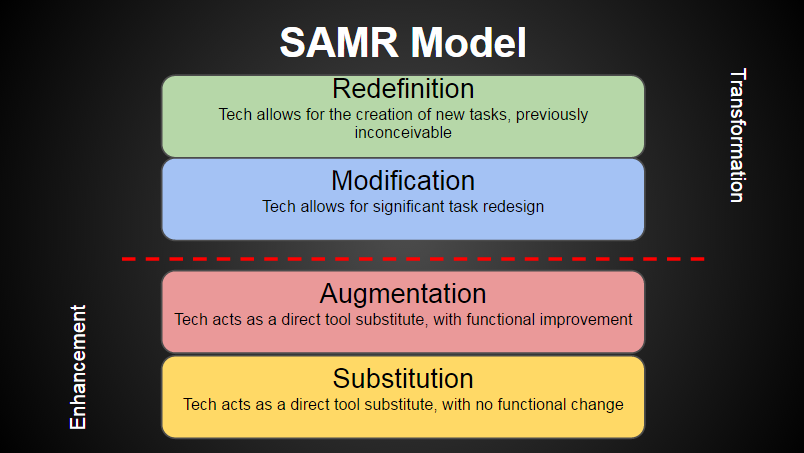
As you begin to think about integrating technology, it would be beneficial to know and understand the SAMR Model.  Dr. Ruben Peuntedura developed the SAMR model as a method of seeing how technology impacts teaching and learning.  SAMR stands for Substitution, Augmentation, Modification, Redefinition and is a great framework for assessing and evaluating the technology you use in your classroom.

The SAMR model talks about 4 levels of integration, two of which enhance the educational experience for the student (Substitution and Augmentation) and two that transform the experience (Modification and Redefinition).  Below is an explanation of the 4 levels with an example of integrating technology at each of those levels in a science curriculum:

  1. SUBSTITUTION: Technology acts as a direct tool substitute with no functional change
    • Students use a word processing application (as a substitute for hand writing a report) to discuss global warming and how they can prevent changes in the atmosphere
  2. AUGMENTATION: Technology acts as a direct tool substitute with functional improvement
    • Students use a word processing application to discuss global warming and how they can prevent changes in the atmosphere, using spell check, the thesaurus and clipart/images to enhance their report
  3. MODIFICATION: Technology allows for significant task redesign
    • Students will design and present a document/flyer that publicize actions individuals can take to positively impact the environment.  They will create and import graphs, charts, and graphics from different programs. 
  4. REDEFINITION:  Technology allows for the creation of new tasks, previously inconceivable and is usually 
    • Teams of students collaborate to create a blog or webpage that promotes positive environmental change.  They would need to include student written articles, research, video, links, and feedback opportunities for readers
To explain this further, when you are using technology in the Substitution and Augmentation levels, the education experience is being enhanced, but it is not providing high levels of student engagement with  limited impact on student learning.  When you move above the line into the Redefinition and Modification levels you begin to transform the education experience.  This will provide the opportunity to modify and redesign tasks in ways that weren't possible without the technology, increasing student engagement with better learning outcomes.  

It is important to understand that it is ok to teach in the Substitution and/or Augmentation level and for certain content/lessons it may be unavoidable.  However, it is equally important to find ways to teach at the Modification and Redefinition levels to engage students providing transformational experiences.  So when it comes to integrating technology in your classroom, don't use technology just to say you use it...find ways to use it to transform student learning...find ways to teach above the line!!


SAMR Model.png


Thursday, January 28, 2016

Looking for Digital Content? Look no further with Edcite!

Whether we like it or not, we live in a very digital world.  Students enter our classrooms with a thirst for digital content.  We often hear that students learn differently today and in order to engage and meet their needs we need to make our classrooms more digital.  Teachers are asked to provide this, but often times are provided little time, guidance or resources. So the question often times asked is "Where do I start?"  A great place to start is with Edcite.

Over my past 10 years of working in educational technology, the best resources are ones provided by teachers...it provides comfort knowing they have been field tested by the experts in the field.  That is why Edcite is a great resource.   It is a free website that allows teachers to find, create, or share interactive digital assignments and assessments.  There are over 11,000 digital assignments across all grade levels that are engaging for students.  My philosophy has always been--why reinvent the wheel. Edcite allows you to take an assignment from other teachers to use as is or customize it to bring your own curricular touch. If you are interested in learning more about it watch the "Edcite: What will you create?" video below and also visit their website.  In addition, be sure to read this blog post, which provides sample assignments.

Edcite: What will you create?


Friday, January 15, 2016

Websites for Music Teachers

This week has been a busy week for our music department.  I believe 4 of the 5 nights have had musical performances.  All though I was not able to attend any of them, word on the street is all the performances were wonderful and very well done.  Some of our buildings have been awarded a casual day in honor of the performances and the student body was asked to "thank a musician!" Congrats to all our faculty and students involved.

With music being on our minds as we wrap up this week, I thought it might be good to provide a few websites for music teachers that I came across on a tech blog I follow (you may be aware of some, but hopefully there are a few that are new):
More music resources for specific devices to come in the future so "stay tuned" (pun intended...ha!ha!)

Kid Friendly Search Engines

Next week we are offering up a digital citizenship seminar to our JS students about internet safety, proper computer use, etc.   As I started to think about the seminar it dawned on me that as we begin teaching our younger students about internet safety and how to properly search the internet, it might be easier to do with search engines we know would provide a safe environment and are kid friendly.

One great resource would be Kiddle.  Kiddle is a kid friendly search engine that provides a safe learning environment.  Here is what Kiddle offers:
  1. It uses safe search, which means there is a filter monitoring content.  
  2. Searches yield both text and images for the students
  3. The font size is larger to assist in readability for kids
  4. Personal identifiable information is not collected and logs are deleted after 24 hrs
  5. You can request additional keyword blocking or additional site blocking by using the form at the bottom of the site. 
Here is a list of a few more kid friendly search engines that would also provide a safe learning environment as our younger students learn to search the internet:
Please note:  These would be great resources to provide your parents. I am sure some of our younger students are on the internet at home, so this might  provide a level of reassurance for their parents.